Friday, August 6, 2010

LOADBALANCE WITH MULTI PPPoE INTERFACE IN PFSENSE 2.0


I/Intro

Now pfsense release version 1.2.3 .It only support 1 interface use PPPoE.But with pfsense 2.0(Beta 4)you can use multi interface use PPPoE and Version 2.0 change config load balance outbound.So I will intro to you config multi interface use PPPoE.


II/Install Pfsense as previous Document

III/Config multi interface use PPPoE config as images


Note:you can create PPPoE Server for test this document with pfsense

IV/config load balance with pfsense

As previous version (1.2.3) you can config as http://conheotiensinh.blogspot.com/2009/10/multi-wan-load-balancing-outbound-use.html.But with pfsense version 2.0 load balance outbound change config.

step1:config gateway (system ->routing) config 2 gateway as images with 192.168.127.128 and 192.168.128.129 IP of PPPoe server (it will auto detect when connect via PPPoE)


step 2:config groups(system ->routing) change to Groups tab and create group as image


Step 3:view status of Gateway and Groups when 2 line connect


Step 4:Test disconnect 1 interface and view status
Step 5:create rule as image


Thanks

Conheotiensinh(quan.hoa@conheotiensinh.co.cc)

Tuesday, June 1, 2010

Setting Up A High-Availability Load Balancer HTTPS(With Failover and Session Support) With HAProxy/Keepalived/Stunnel


I/INTRO

As this document http://conheotiensinh.blogspot.com/2010/05/setting-up-high-availability-load_14.html.I setup load balancer for HTTP in Haproxy.But Haproxy not support SSL(HTTPS) directly So I will intro config haproxy support SSL use stunnel(As haproxy site require need install Stunnel for support SSL(HTTPS...))

II/INSTALL


2/Install Stunnel

you need insert patch of haproxy to Stunnel packet(I build rpm packet with insert patch of haproxy.If you need it for install easy Please contact me with email:quan.hoa@conheotiensinh.co.cc)

3/Config Keepalived as document:


4/config Haproxy in both loadbalance

Edit /etc/haproxy/haproxy.cfg

stats enable
stats auth test:123
listen domain_cluster_https 192.168.236.130:80
mode http
balance roundrobin
cookie SERVERID insert nocache
option forwardfor except 192.168.236.130
option httpchk HEAD /check.txt HTTP/1.0
server server1 192.168.127.131:80 cookie A check
server server2 192.168.127.132:80 cookie B check

5/config Stunnel

Edit /etc/stunnel/stunnel.conf

cert = /etc/stunnel/monit.pem # you need install cert
;key = /etc/stunnel/mail.key

; Some security enhancements for UNIX systems - comment them out on Win32
;chroot = /var/run/stunnel/
setuid = root
setgid = root
; PID is created inside chroot jail
;pid = /stunnel.pid
pid = /etc/stunnel/stunnel.pid
;debug = 3
;output = /etc/stunnel/stunnel.log
; Some performance tunings
socket = l:TCP_NODELAY=1
socket = r:TCP_NODELAY=1
[https]
accept=192.168.236.130:443
connect=192.168.236.130:80


6/Test You can access web mail with URL:

https://192.168.236.130/mail


Check status HAPROXY with URL:https://192.168.236.130/haproxy?stats


Beside You can use another solution for this problem:

Use Pound for Reverse Proxy( SSL )and Haproxy for load balancer

Thanks

Friday, May 14, 2010

Setting Up A High-Availability Load Balancer(With Failover and Session Support) With HAProxy/Keepalived


I/INTRO
As you know,We any solution for load load blancer in Linux as:

Pfsense:http://conheotiensinh.blogspot.com/2009/09/load-balance-and-cluster-failover.htmlOnly support layer 4(can't deploy with system need Login)

Pen is a very simple load balancer for TCP protocols. It supports source IP-based persistence for up to 2048 clients. Supports IP-based ACLs. Uses select() and supports higher loads than Pound but will not scale very well to thousands of simultaneous connections.

Pound can be seen as a complement to HAProxy. It supports SSL, and can direct traffic according to the requested URL. Its code is very small and will stay small for easy auditing. Its configuration file is very small too. However, it does not support persistence, and the performance associated to its multi-threaded model limits its usage to medium sites only.

Beside We can use Linux Virtual Servers (LVS),Pure Load Balancer (PLB)But with load balance support layer 7 But with me HAproxy best choice.HAProxy is a free, very fast and reliable solution offering high availability, load balancing, and proxying for TCP and HTTP-based applications. It is particularly suited for web sites crawling under very high loads while needing persistence or Layer 7 processing. Supporting tens of thousands of connections is clearly realistic with todays hardware. Its mode of operation makes its integration into existing architectures very easy and riskless, while still offering the possibility not to expose fragile web servers to the Net.

II/INSTALL


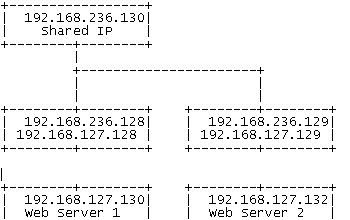
For this howto I set up four Centos systems (minimal installation without gui etc.) with the following configuration:

Load Balancer 1

IP: 192.168.236.128(eth0) and 192.168.127.128(eth1) Shared IP: 192.168.236.130

Load Balancer 2

IP: 192.168.236.129 192.168.127.129(eth1) Shared IP: 192.168.236.130

Web Server 1

IP: 192.168.127.130

Web Server 2


IP: 192.168.127.132

1/Intall Haproxy and keepalived

You can install from source but for easier you need install rpm packet(if you need lastest rpm packet of HAPROXY(version 1.4.5) and Keepalived(version 1.1.20) .Please contact me with email:quan.hoa@conheotiensinh.co.cc.I will give it to you

2/Edit /etc/haproxy/haproxy.cfg in both load balancer server as following:

global
log 127.0.0.1 local2
chroot /var/lib/haproxy
pidfile /var/run/haproxy.pid
maxconn 4000
user haproxy
group haproxy
daemon

defaults
mode http
log global
option dontlognull
option httpclose
option httplog
option forwardfor
option redispatch
timeout connect 10000 # default 10 second time out if a backend is not found
timeout client 300000
timeout server 300000
maxconn 60000
retries 3

listen webfarm 192.168.236.130:80
mode http
stats enable
stats auth test:123
#balance roundrobin
balance source
cookie JSESSIONID prefix
#balance source
#cookie SERVERID insert indirect
option httpclose
option forwardfor
option httpchk HEAD /check.txt HTTP/1.0
server web1 192.168.127.130:80 cookie A check
server web2 192.168.127.132:80 cookie B check

3/Configure Keepalived

As this Document I use keepalived for HA(beside you can use heartbeat and VRRP for cluster)

edit /etc/keepalived/keepalived.conf in both load balance(only change priority 101 on master, 100 on backup)


vrrp_script chk_haproxy { # Requires keepalived-1.1.13
script "killall -0 haproxy" # cheaper than pidof
interval 2 # check every 2 seconds
weight 2 # add 2 points of prio if OK
}

vrrp_instance VI_1 {
interface eth0
state MASTER
virtual_router_id 51
priority 101 # 101 on master, 100 on backup
virtual_ipaddress {
192.168.236.130
}
track_script {
chk_haproxy
}
}

4/Edit /etc/sysctl.conf in both load balance

# Allow HAProxy shared IP
net.ipv4.ip_nonlocal_bind = 1


5/Test

I setup 2 webmail roundcube for test this haproxy

a/Login webmail and check log


b/Stop LB1 and check log in Load balance 2

c/Check status HAPROXY with URL:http://192.168.236.130/haproxy?stats


Thanks

Tuesday, April 6, 2010

Deploy iptables Cluster using Fwbuilder and Heartbeat

I/Intro

As We know fwbuilder is a GUI firewall configuration and management tool that supports iptables (netfilter), ipfilter, pf, ipfw, Cisco PIX (FWSM, ASA) and Cisco routers extended access lists. Both professional network administrators and hobbyists managing firewalls with policies more complex that is allowed by simple web based UI can simplify management tasks with the application. The program runs on Linux, FreeBSD, OpenBSD, Windows and Mac OS X and can manage both local and remote firewalls.

Firewall Builder is packaged with most Linux distributions. If the package is not available in the base distribution, it usually can be found in "extras". You need to install package that has supporting API library libfwbuilder and package fwbuilder that contains Firewall Builder GUI and policy compilers. You can use your favorite package management tool sucn as yum, apt-get or aptitude to find and install them. On FreeBSD and OpenBSD Firewall Builder is part of ports, you can find it in /usr/ports/security/fwbuilder. Now The new version comes with support for high availability firewall configurations, including heartbeat, vrrpd, keepalived, conntrackd on Linux, CARP and pfsync on OpenBSD and PIX failover configuration. It can generate configuration scripts to manage ip addresses, VLAN, bridge and bonding interfaces on the firewall. Drop-in support for OpenWRT firewall script is now available, as well as experimental integration with IPCOP firewall appliances. The GUI has supports undo/redo of unlimited depth and was generally streamlined and has many other improvements.you can prefer:http://www.fwbuilder.org/

2/Install

Step 1:config IP for 2 firewall as image


Step 2:install heartbeat

yum -y install heartbeat

yum -y install heartbeat# run again becaus of errors


Step 3:copy file configure default.It's necessary to do this on both systems

cp /usr/share/doc/heartbeat-2.1.3/authkeys /etc/ha.d/authkeys

cp /usr/share/doc/heartbeat-2.1.3/ ha.cf etc/ha.d/ha.cf

cp /usr/share/doc/heartbeat-2.1.3/haresources etc/ha.d/haresources


Step 4 :Edit /etc/ha.d/authkeys It's necessary to do this on both systems

auth 3

3 md5 123

Step 5:edit etc/ha.d/ha.cf.It's necessary to do this on both systems

keepalive 2 #line 52

deadtime 10 # line 60

mcast eth0 225.0.0.1 694 1 0 #line 117

mcast eth1 225.0.0.1 694 1 0 #line 118

node fw1.test.vn #add it in BOTTOM
node fw2.test.vn #add it in BOTTOM

step 6:edit etc/ha.d/haresources


fw1.test.vn IPaddr::192.168.10.145/24/eth0/192.168.10.255

fw1.test.vn IPaddr::172.16.1.3/16/eth1/172.16.255.255

Step 7:

authkeys should have permissions "0600", other files can have permissions "0644"

Step 8:

/etc/init.d/heartbeat start

Step 9:Install fwbuilder

#rpm -Uvh libfwbuilder*
#rpm -Uvh fwbuilder*

Step 10:

Create 2 fw as image in Fwbuilder

Step 11:


Step 12:

we can open udp port 694 and udp port 3780 in both fw

Step 13:

Create Nat and Policy for cluster (it created as fwbuilder stand alone)

Step 14:Test


shutdown fw1 test again


start fw1 test again


beside you can use vrrp,carp.... for cluster.

if you need file template for config .Please send mail to quan.hoa@conheotiensinh.co.cc.I Will send it to you


Thanks

http://conheotiensinh.blogspot.com/

Thursday, December 31, 2009

INSTALL IPS(SNORT) WITH EasyIDS and Guardian

I/Intro

An Intrusion prevention system (IPS) is a network security device that monitors network and/or system activities for malicious or unwanted behavior and can react, in real-time, to block or prevent those activities. Network-based IPS, for example, will operate in-line to monitor all network traffic for malicious code or attacks . When an attack is detected, it can drop the offending packets while still allowing all other traffic to pass. Intrusion prevention technology is considered by some to be an extension of intrusion detection (IDS) technology

II/INSTALL

Step 1:Install IDS as http://conheotiensinh.blogspot.com/2009/12/install-ids-in-centos-with-5-minutes.html

Step 2:IPS – Guardian

Guardian is a security program which works in conjunction with Snort to automaticly update firewall rules based on alerts generated by Snort.
The updated firewall rules block all incoming data from the IP address of the attacking machine (the machine which caused Snort to generate an alert.
There is also logic in place which pervents blocking important machines, such as DNS servers, gateways, and whatever else you want.

Step 3:

Go to http://www.chaotic.org/guardian/ to download Guardian. The current version as at this writing is version 1.7.
#wget http://www.chaotic.org/guardian/guardian-1.7.tar.gz
#tar -xzvf guardian-1.7.tar.gz
#
cd guardian-1.7
#cp guardian.pl /usr/local/bin/
#cp scripts/iptables_block.sh /usr/local/bin/guardian_block.sh
#cp scripts/iptables_unblock.sh /usr/local/bin/guardian_unblock.sh
#cp guardian.conf /etc/snort/
#touch /etc/snort/guardian.ignore
#touch /etc/snort/guardian.target
#touch /var/log/snort/guardian.log


Step 4:

edit /etc/snort/guardian.conf change some variables

HostIpAddr xxx.xxx.xxx.xxx (IP snort monitor)
Interface ETH01 (interface snort monitor)
HostGatewayByte 75
Logfile /var/log/snort/guardian.log
AlertFile /var/log/messages
IgnoreFile /etc/snort/guardian.ignore
TargetFile /etc/snort/guardian.target
TimeLimit 86400

Step 5:
Edit /usr/local/bin/guardian_block.sh change some variables(this shell will block ip attacker and alert mail to test@conheotiensinh.co.cc )


source=$1
interface=$2

/sbin/iptables -I INPUT -s $source -i $interface -j DROP
/sbin/iptables -I FORWARD -s $source -i $interface -j DROP
echo "$source is blocked!" | mail -s "Snort alert is blocked" test@conheotiensinh.co.cc

Step 6:

Edit /usr/local/bin/guardian_unblock.sh change some variables(this shell will delete ip attaker from block ip and alert mail to test@conheotiensinh.co.cc)


source=$1
interface=$2

/sbin/iptables -D INPUT -s $source -i $interface -j DROP
/sbin/iptables -D FORWARD -s $source -i $interface -j DROP

echo "$source is blocked for 24 hours! It is released!" | mail -s "Snort alert is released" test@conheotiensinh.co.cc

Step 7:

Edit /etc/snort/guardian.target

add ip (snort monitor)

Step 8:
Edit /etc/snort/guardian.ignore


add ip 127.0.0.1

Step 9:

Edit /etc/snort/snort.conf

uncomment “output alert_syslog: LOG_AUTH LOG_ALERT”

service snort restart

Step 10:create file shell guardian.sh

#————— CUT HERE —————–#

#!/bin/bash

start()
{
export PATH=$PATH:/usr/local/bin
/usr/local/bin/guardian.pl -c /etc/snort/guardian.conf
}

stop()
{
ps aux | grep 'guardian.pl *-c' 2>&1 > /dev/null
if [ $? -eq 0 ];
then
kill `ps aux | grep 'guardian.pl *-c' | awk '{print $2}'`
else
echo "Guardian is not running ....."
fi
}

status()
{
ps aux | grep 'guardian.pl *-c' 2>&1 > /dev/null
if [ $? -eq 0 ];
then
echo "Guardian is Running ....."
else
echo "Guardian is not Running ...."
fi
}

case "$1" in
start)
start
;;
stop)
stop
;;
restart)
stop
start
;;
status)
status;;
*)
echo $"Usage: $0 {start|stop|restart|status}"
esac


Step 11:

chmod +x guardian.sh
cp guardian.sh /usr/local/bin/guardian.sh

/usr/local/bin/guardian.sh start

Step 12:test

use nmap test

#nmap -v -sS xxx.xxx.xxx.xxx


Beside you can use Easy IDS as IPS with other Firewall:FreeBSD using IPFW,Checkpoint, PIX....use SSH copy rule to firewall


Please prefer:http://www.chaotic.org/guardian/


Tuesday, December 29, 2009

Install IDS in Centos with 5 minutes


I/Intro

An Intrusion detection system (IDS) is a device (or application) that monitors network and/or system activities for malicious activities or policy violation.IDS install very hard (you need install Snort,HTTP,MYSQL and ......). But With EasyIDS you install IDS easier

II/Install

Step 1:you download ISO EasyIDS from http://sourceforge.net/projects/easyids/files/

Step 2:install It as install Centos OS (EasyIDS 4.0 run with Centos 5.4)

Step3:config Ip for Nic Card

Setp 4: To access the EasyIDS GUI browse to https://IPADDRESS from another computer and login with the username admin and the password password.

Step 5:atttack Easy IDS and check Status in Easy IDS

Beside you can use Easey IDS as IPS(Intrusion Prevention System) with iptables and Guardian.I will intro later


Thanks

Friday, December 4, 2009

INSTALL Monit for Monitor System

I/INTRO

Monit is a free open source utility for managing and monitoring, processes, files, directories and filesystems on a UNIX system. Monit conducts automatic maintenance and repair and can execute meaningful causal actions in error situations.

II/INSTALL

Step 1:Install monit

#wget http://packages.sw.be/rpmforge-release/rpmforge-release-0.3.6-1.el5.rf.i386.rpm
#rpm -Uvh rpmforge-release-0.3.6-1.el5.rf.i386.rpm
#yum install monit
#chkconfig --levels 235 monit on

Step 2:Config Monit

edit /etc/moni.d/monitrc
set daemon  60
set logfile syslog facility log_daemon
set mailserver localhost #mail server
set mail-format { from: monit@server1.example.com }
set alert root@localhost #alert to admin with email adrress root@localhost
set httpd port 2812 and
SSL ENABLE
PEMFILE /var/certs/monit.pem
allow admin:test

some features example of monit

*check host CUIBAP with address 19.16.12.32
if failed icmp type echo with timeout 20 seconds then alert
(check host if over 20 second it will alert mail to admin)

*check host CONHEO with address 132.163.193.3
if failed port 25 with timeout 30 seconds then alert
(check Service SMTP if over 30 second it will alert mail to admin)

*check process sshd with pidfile /var/run/sshd.pid
start program "/etc/init.d/sshd start"
stop program "/etc/init.d/sshd stop"
if failed port 22 protocol ssh then restart
if failed port 22 protocol ssh then alert
if 5 restarts within 5 cycles then timeout
(check Service SSH if it down monit auto start only run in localhost)

Step 3:access monit via web mail port 2812